Vyre / Architecture / Flows
Flows, one of the four pillars.
Flows: work that runs the same way every time.
A Flow is a stored list of steps that starts from a trigger and runs under an approver’s authority. It stops for a person wherever a send, a question or a task needs one.
A trigger fires, the steps run, and a person holds the send.
A Flow is a trigger and a list of steps, kept as structured data. Each step goes through the kernel as the approver’s own narrowed chain, so a Flow reaches no more than the person who approved it.
- It waits where it shouldA step can ask a person or a role and stop the run until they answer. A send over a limit, or to a recipient taken from outside content, is held for a yes.
- It hands work to agentsA “Hand to an agent” step becomes a task for the named agent, which wakes with the task and the record.
- It explains itselfEvery run has a page with each step’s status, when a wait wakes and who approved the version.
Animation: a Flow with an approval hold
What starts one, and what it does.
Five triggers, twenty-two kinds of step.
A person
Someone, or an assistant, runs it with one call.
A schedule
A cron line, an interval of at least a minute, or a single time, read in the Space’s time zone, with business hours, holidays and a choice for what to do after downtime.
A record
A record created, updated or removed, optionally one changed field or a condition. Or a record entering a named stage.
A form or a call
A form submission, or an inbound call to the Flow’s own path.
A watcher
Something new in a watched place, such as a mailbox or a folder.
Logic and records
If and else, for each, side by side, wait, wait for someone’s yes. Find, look up, filter, create, update, find or create, remove, move to a stage.
Send, AI and work
Send an email or a text. Call a web address. Hand to an agent, sort into groups, pull out facts. Assign a task, start a project, run another Flow.
Tokens
Text takes values such as {client.first_name}, {today} and {project.client.phone}, with an offset and a format. Expressions are parsed, never run as code.
How a run is made safe.
Approved, replayable, and limited to one person’s reach.
The runner is part of the kernel. Five facts keep a Flow from doing more than the person who approved it.
- 1A trigger arrivesThe run id is a hash of the Flow and the trigger key, so a trigger delivered twice is one run.
- 2An approved versionA definition never changes. An edit is a new version with a hash, and approval binds that version to the approver.
- 3The approver’s chainEach effect step is checked against the Flow’s declared caps, then authorized as the automation and the approver together.
- 4A ledgerEach step is written before and after it acts, keyed by run, step and loop index. The key doubles as the idempotency key.
- 5A held actA send that needs a person becomes a task. The person’s decision gives a single-use approval for exactly that act.
- Versions with a way back.Roll back to an earlier version and the person is asked again. Nothing carries over from the old approval. A saved test case that fails blocks approval.
- One yes covers a bounded send.An approved version carries a yes for its destinations and limits, up to a count and a rate per minute. Beyond that, a person is asked.
- Untrusted input is marked.A run started by or reading outside content is tainted, and its outward and grant steps ask a person.
- A lost grant pauses the Flow.If the approver loses access, the Flow pauses with the reason instead of running as someone else.
- Loops are bounded.At most 200 steps, 6 levels of nesting and 1000 repeats. A runaway pauses the Flow and raises a card.
- A switch for all of it.Pause with all or drain holds new triggers in order. Resume runs them, or drops them.
Tracks.
One record type, one Flow per kind of work.
A type can follow several tracks through stage sets. Write one Flow for each, with a record trigger whose condition names the track, and each Flow runs only for its own records.
Track A
A record trigger with the condition that the practice area equals the first track, and its own stages and tasks.
Track B
The same trigger with the second track’s condition. Same records, its own Playbook and Flows.
Failure paths
A step can retry named transient errors, run its own on-failure steps, and the whole Flow can run steps such as a task for the partner when a run fails.
In the app.
The Flows screen, with sample data.
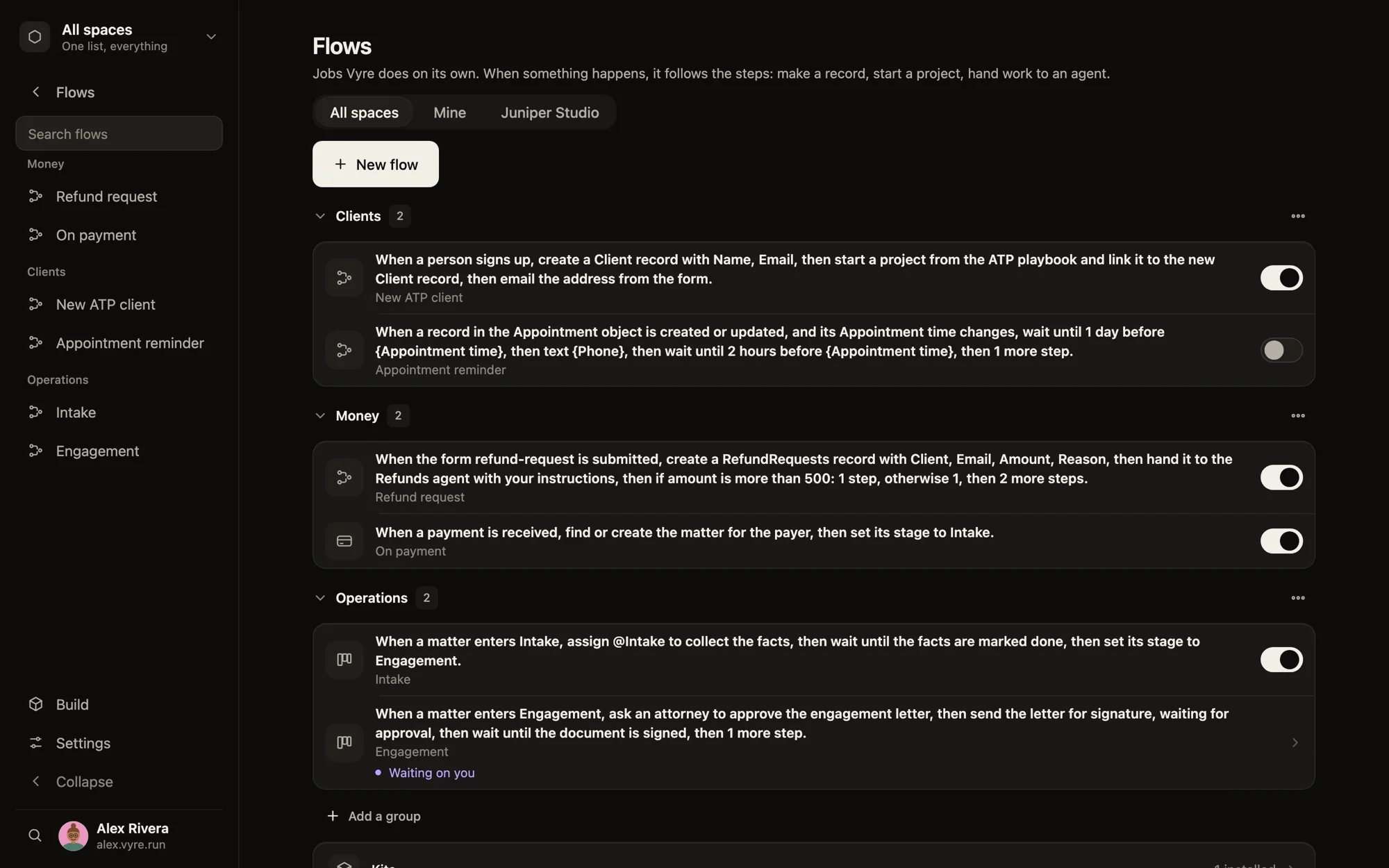
An agent can draft a Flow. Nothing runs until a person approves.
- Open to models
flows.define,flows.propose,flows.simulate,flows.start,flows.get,flows.runs,flows.healthandflows.from-chatrun under the caller’s own chain. - Person only
flows.approvealso asks for presence. Rollback, pause, resume and access are a person’s too. - The Engineer helpsDescribe a Flow in plain words and the Engineer drafts it, simulates it and proposes it. A person’s yes applies it.
- Starts
- flow.started, flow.queued
- Ends
- flow.finished, flow.cancelled
- Trouble
- flow.paused, flow.stale, flow.stuck, flow.retried
Coming next
- 0.5.1: a due time on an agent step with a failure path, and a failure panel on every step in the editor.
- 0.5.1: CC, BCC and attachments on a Flow email, with date helpers.
Direction, not a shipped feature. Dates and scope live on the direction page.
Bring your own software stack, or build a module.
Vyre can be extended by integrating your Zoho, QuickBooks, RingCentral and the rest of your software stack*. Today, a Flow web step calls an outside API with a connection from the Vault. When the palette lacks a step, a custom module adds a tool that a Flow calls with a call step.
*where the vendor provides an API
- Coming in 0.5.2
- Integrations, packaged as modules, for the software a firm already runs.
- Today
- A connection in the Vault plus a Flow web step, or a custom module. It passes through the same grants and checks as any other.
- Over MCP
- An AI agent connected over Vyre’s MCP can help set this up. It acts as the person who connected it, within its key’s reach, and the Gate still holds anything that leaves.
Connects to.
How it fits with the rest of Vyre.
Code paths: kernel/flows/runner.js · kernel/flows/schema.js · kernel/flows/triggers.js · kernel/flows/standing.js · core/daemon/agent-wake.js